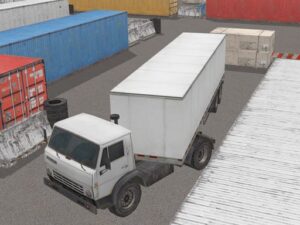
Can you actually park a massive rig in a space the size of a shoebox? Truck Space 2 Unblocked Game is a parking simulation where your trailer has a mind of its own, turning every tight corner into a white-knuckle test of spatial awareness. No download, no hassle—just load it in your browser and start wrestling with physics-defying angles.
Every level demands precision you didn’t know you had. You’re threading an unwieldy truck through narrow alleys, backing into impossible gaps, and fighting the trailer’s refusal to cooperate. Truck parking games unblocked typically feel forgiving; this one doesn’t. Success means mastering counterintuitive angles, reading space like a chess player, and accepting that one wrong turn costs you the entire attempt. Play Truck Space 2 online free on Magbei and discover why skill driving games no download hit different when the stakes are spatial precision. The tension builds with each level—that satisfying burn of nailing an impossible maneuver keeps you grinding for just one more try.
If this one's got you hooked, wait until you try Light It Rush. Don't say we didn't warn you. 😏
Truck Space 2, a precision parking browser game playable free on magbei.com, challenges you to reverse massive rigs with trailers into tight parking spots using precision steering and spatial awareness.
Start each level by positioning your truck at the entrance. Use arrow keys or WASD to move forward and backward, then...
Truck Space 2, a precision parking browser game playable free on magbei.com, challenges you to reverse massive rigs with trailers into tight parking spots using precision steering and spatial awareness.
Start each level by positioning your truck at the entrance. Use arrow keys or WASD to move forward and backward, then rotate your view to judge trailer angle—this is where the real puzzle lives. The reverse-parking mechanic demands you anticipate how your trailer will swing before you commit to each move; oversteer and you’ll clip the boundary, undershooting wastes precious space. Progress through increasingly cramped lots, each one punishing hesitation and sloppy inputs. No download required—jump straight into this skill-driving challenge from any browser.
Start by learning one lot inside out before rushing. Watch your trailer’s rear end in the camera; it lags behind your cab’s rotation, so begin your angle correction earlier than feels natural. Tight spaces reward slow, deliberate movements over frantic steering—patience beats panic every time.
Controls
PC / Desktop
Move: WASD / ARROW KEYS
Camera: MOUSE
TRUCK SPACE 2 // FAQ
The trailer physics in Truck Space 2 work like real-world articulated vehicles—when you reverse and turn the wheel, the trailer's rear end swings outward in the opposite direction of your steering input, which catches most players off guard at first. Master this counterintuitive angle by making small, deliberate adjustments and using your mouse to rotate the camera view so you can see exactly where the trailer's back end is heading before it clips a wall.
Truck Space 2 demands that you approach tight spaces at extreme angles rather than head-on, using the full length of the alley to thread your rig through by reversing at shallow arcs. Pick a reference point on the ground or a wall edge, move forward and backward incrementally using WASD or arrow keys, and pause frequently to rotate your view and confirm clearance before committing to the next inch.
Truck Space 2 typically saves your level progress locally in your browser, so you can close and return later without losing your place, though this depends on your browser's cache settings and whether cookies are enabled. If you're unsure, check the game menu for a save or progress indicator before closing.
Truck Space 2 is optimized for desktop browsers and uses mouse controls for camera rotation and WASD or arrow keys for movement, making it best suited for computers rather than mobile devices. You can attempt it on a tablet with a keyboard accessory, but the precision parking demands will be significantly harder without a proper pointing device.
Start by slowly moving forward with arrow keys or WASD to feel how the truck responds, then rotate your camera with the mouse to scout the entire parking bay before attempting any reversal. Use the entrance as your reference point, make micro-adjustments rather than sweeping turns, and accept that Truck Space 2 rewards patience over speed—each level is a puzzle that reveals its solution only through deliberate positioning.