
WaterColor
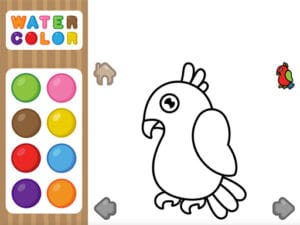
WaterColor Unblocked Game is a digital painting sandbox where you blend pigments, layer washes, and watch colors bloom across the canvas in real time. Play it free in any browser—no installation, no login walls, just instant creative access even from school networks.
Grab your virtual brush and experiment with a vibrant palette that responds like real watercolor. Mix hues directly on the canvas, dilute with water, and layer transparent glazes to build depth. There’s no timer, no scoring system, no wrong moves—just you, the pigments, and the satisfaction of watching a blank page transform into something colorful. Whether you’re testing color theory or simply doodling, sessions flow at your own pace.
Kids and casual artists love this WaterColor browser game for its mess-free approach to traditional painting. The controls are intuitive enough for younger players yet offer enough blending depth to keep experienced artists engaged. On magbei.com, you get a free browser game with zero barriers—load it, create, and save your work without downloads or interruptions.
Players who loved this also can't stop talking about Subway Winter Vacation. Free, no strings attached.
How to Play
WaterColor on magbei.com is a browser game that challenges you to create digital paintings by selecting colors and applying watercolor-style strokes to your canvas, with the core loop built around blending and layering hues without the mess.
Start by picking your palette from the color wheel—experiment freely since there’s no penalty for mistakes. Tap or click to apply paint to the canvas or template, then layer different hues on top of each other to watch them blend naturally. The real magic happens when you overlap wet strokes; colors mix just like real watercolor, creating new shades and soft transitions. Try building depth by starting light, then adding darker tones to shadow areas. Don’t rush—take time to see how each new color reacts with what’s already on the page. The best results come from slow, deliberate layering rather than frantic brushwork, so treat each stroke as part of a bigger composition.
Controls
PC / Desktop
- Select Color: LEFT CLICK
- Paint: LEFT CLICK + Drag
Mobile
- Select Color: TAP
- Paint: DRAG